This may be of interest to those utlising ICT in the classroom:
Showing posts with label online learning. Show all posts
Showing posts with label online learning. Show all posts
Tuesday, June 21, 2011


Wednesday, August 04, 2010
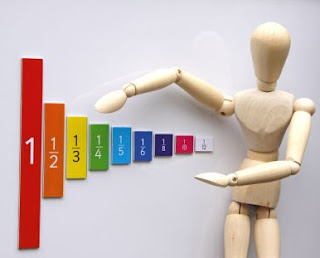
Room 3 Fraction Maths
Hi squiddlers - try out these digital learning objects from NZmaths:
http://digistore.tki.org.nz/ec/viewMetadata.action?id=L2801
http://digistore.tki.org.nz/ec/viewMetadata.action?id=L2801
http://digistore.tki.org.nz/ec/viewMetadata.action?id=L2804
http://digistore.tki.org.nz/ec/viewMetadata.action?id=L2805
http://digistore.tki.org.nz/ec/viewMetadata.action?id=L2806
http://digistore.tki.org.nz/ec/viewMetadata.action?id=L2801
http://digistore.tki.org.nz/ec/viewMetadata.action?id=L2801
http://digistore.tki.org.nz/ec/viewMetadata.action?id=L2804
http://digistore.tki.org.nz/ec/viewMetadata.action?id=L2805
http://digistore.tki.org.nz/ec/viewMetadata.action?id=L2806

Friday, April 02, 2010
Cybersafety, Games and Social Bookmarking
Thanks to my Diigo account, which allows me to save my bookmarks online instead of just one computer, I also share resources with others online. today I received an email update that includes resources for learning cybersafety through games. The lady who shared it is helping others simply by saving her bookmarks online. Her community of followers then receive notice of what she has saved in case they want to share some of her findings.
Check it out here

Check it out here

Monday, February 08, 2010
ICT Citizenship at Peachgrove
Here are some links to resources for learning about Citizenship at Peachgrove:
http://education.citizenship.govt.nz/
http://education.citizenship.govt.nz/primary/teachers
http://www.blogger.com/goog_1265605989915
Opinions about citizenship
responsible citizenship - an opinion
Digital Citizenship with Hector
So, what is Citizenship? Why should we think about it? How does it affect us?
Work in groups of two or three to develop a PowerPoint presentation or an online equivalent
[e.g. Google Document, blog, wiki*] to state your case for the importance of being a responsible citizen.
If working online you also need to include digital citizenship as a theme.

* Please check first for permission.
N.B. Please use internet information properly by re-writing it in your own words and putting a reference after your statement saying where you got the info from.
e.g. Citizenship is about belonging to a country and being legally allowed to vote in that country's elections. - http://www.citizenship.com/
The concept of the Citizen was very important in ancient Rome.
http://education.citizenship.govt.nz/
http://education.citizenship.govt.nz/primary/teachers
http://www.blogger.com/goog_1265605989915
Opinions about citizenship
responsible citizenship - an opinion
Digital Citizenship with Hector
So, what is Citizenship? Why should we think about it? How does it affect us?
Work in groups of two or three to develop a PowerPoint presentation or an online equivalent
[e.g. Google Document, blog, wiki*] to state your case for the importance of being a responsible citizen.
If working online you also need to include digital citizenship as a theme.

* Please check first for permission.
N.B. Please use internet information properly by re-writing it in your own words and putting a reference after your statement saying where you got the info from.
e.g. Citizenship is about belonging to a country and being legally allowed to vote in that country's elections. - http://www.citizenship.com/
The concept of the Citizen was very important in ancient Rome.
Tuesday, January 06, 2009
Hone your computer skills
http://www.internet4classrooms.com/on-line.htm
try this site out for modules designed for kids your age [supposedly] to learn the skills involved in using several everyday computer applications like Word, Excel, Powerpoint, etc.
Let me know if you think they would be useful for kids with limited experience of these things.
:-)
try this site out for modules designed for kids your age [supposedly] to learn the skills involved in using several everyday computer applications like Word, Excel, Powerpoint, etc.
Let me know if you think they would be useful for kids with limited experience of these things.
:-)
the science of candy

How to make science irresistable??? Well, it should be anyway, but a little sugar seems to help :-)
Making Candy
Sunday, January 04, 2009
TED and interesting human stuff

Here is a link to a video clip with a dude chatting about some interesting human bits n bobs:
During part of it, you may recall what I told you about Protestantism, schisms within the Christian church, the significance of a monk named Martin Luther and the invention of the printing press. Interestingly, you guys had a more in-depth discussion about it than these educated adults do, but it is an entertainment "lecture" rather than a discussion - enjoyable though :-)
There are also references to space travel, meteorites and the energy required to read this post.
[Thanks to MrsBanjer from my Twitter community for the link.]
Saturday, January 03, 2009
ePortfolios
what is an eportfolio? how have you used them? what are the benefits or drawbacks?
In Room5 last year many of our books ended up being pretty lame as we did alot of work on things like blogs and wikis. Most parents never saw this wok for one reason or another. Yet i suspect the work online counted as an eportfolio of some kind. what do you think?
In Room5 last year many of our books ended up being pretty lame as we did alot of work on things like blogs and wikis. Most parents never saw this wok for one reason or another. Yet i suspect the work online counted as an eportfolio of some kind. what do you think?
Sunday, November 09, 2008
get some perspective
thanks to the two kiwi bloke principals who fwded this clip to each other and via their interesting blogs, to me, so i can share it with you...
teachertube clip
teachertube clip
Teachers need to learn too
teachers need to be learners to be able to help students be better learners - see Angela Maiers quote:
"Teachers need to be great learners to lead great learners. I believe that learning is a lifelong journey, an ongoing exploration and way of life. I challenge myself and others to always be striving to find and share big ideas in every million dollar conversation."
Her blog is a repository for some interesting thoughts and resources... enjoy
"Teachers need to be great learners to lead great learners. I believe that learning is a lifelong journey, an ongoing exploration and way of life. I challenge myself and others to always be striving to find and share big ideas in every million dollar conversation."
Her blog is a repository for some interesting thoughts and resources... enjoy
Saturday, November 08, 2008
What can we do with computers?
Having seen the results of your Aussie Rules computer skills test, I realised there might be some fundamental 'stuff' you kids should or could know to help you develop your computer literacy.
I looked at the wise and wonderful Suzie Vespers ICT wiki and found a page which has someones list of what US 7th graders should be able to do. You will not know all the software or applications, and that doesn't matter, but you coudl checkout what you can do off the list. Maybe you will investigate some of the other things online and report back to us all if they seem useful or interesting.
Enjoy ;-)
http://saintmichael.wikispaces.com/seventh
I looked at the wise and wonderful Suzie Vespers ICT wiki and found a page which has someones list of what US 7th graders should be able to do. You will not know all the software or applications, and that doesn't matter, but you coudl checkout what you can do off the list. Maybe you will investigate some of the other things online and report back to us all if they seem useful or interesting.
Enjoy ;-)
http://saintmichael.wikispaces.com/seventh
Sunday, October 12, 2008
Its a small world afterall! - globalisation

Term Four collaborative project with M3. Discovering what globalisation is all about and how it affects us...
Also, check out their Kenyan project - very cool to actually make a difference.
:-)
Maybe My Teehan's class might join us, and perhaps the Teaching Sagittarian's new class in Bangkok could be involved? Anyone else keen?
Let's change the world a little bit at a time!
We will work together using blogs and wikis, Edmodo for microblogging and much more
And don't worry Mudpies - we will work out how to mummify chickens in relation to this, i promise!!!
Check out the Movie - The Corporation - and how it got some students interested.
Thursday, October 02, 2008
Charlotte's Web

I've seen many very cool spiders this week and dreamt of them too.
When I was younger I really loved Charlotte's Web. Here is Mrs Freeman's class book review site thingy...
Tuesday, September 09, 2008
Glogster
Who has a glog? What's your glog nickname?
How could you use your glog to showcase your school work?
Research eportfolios and let us know how we could create really cool ones that will impress our audience...
mrw00dy [on glogster]
How could you use your glog to showcase your school work?
Research eportfolios and let us know how we could create really cool ones that will impress our audience...
mrw00dy [on glogster]
Monday, September 08, 2008
Cool teacher's blog...
Here is another teacher's blog for you to investigate. It has a post about "an amazing lady" [Suzie Vesper - cool name!] that might inspire you with new ideas for integrating ICTs into our term four inquiry projects.
Let me know if you discover anything useful or exciting and how you might use it.
HUZZAh!
Let me know if you discover anything useful or exciting and how you might use it.
HUZZAh!
Sunday, June 08, 2008
upcoming science lessons

These links are to science lessons we will be doing in class :-)
They should either help you develop concepts relevant to our imminent science fair, or be of interest to those of you with a scientific mind, or more specifically with an interest in 'space'...
Oh, and there's one relating to P.E. and fitness testing.
material properties - plastics
testing pulse rates:
ranking environmental problems:
using learning objects to understand day and night:
Using online models to understand the phases of the moon:
Changing theories about Mars:
how science ideas change over time:
types of scientific investigations:
Sunday, May 25, 2008
writing inspiration

this is an interesting site that i found via a fellow twitterer...
ipods can be used to help inspire writing too....
Friday, February 29, 2008
Dr Abdullahi's Human Body lesson

Our guest lecturer gave us a test today on the human body. Here is a site for you to investigate. Snowgirl found it for us - well done for sharing information and researching independently.
Who would like to disect a fish?
Enjoy!
Monday, February 25, 2008
extra homework
Hi Kids and Parents - if you require extra homework, try this site. Mrs Barham suggested it as a possible source of extra learning.
http://schools.look4.net.nz/
Mrs Barham supports our use of blogs for extending learning. I wonder if we can help her to become a regular contributor to our blog?
http://schools.look4.net.nz/
Mrs Barham supports our use of blogs for extending learning. I wonder if we can help her to become a regular contributor to our blog?
Tuesday, February 19, 2008
Measurement
Our maths for Term One is to do with measurement. I have attached some hyperlinks to NZ Maths online, digital learning objects, and TKI's eLearning sites...
http://www.nzmaths.co.nz/LearningObjects/
http://www.tki.org.nz/e/search/retrieve_search.php?&search_term_data=DC.Description%3BDC.Title%3BDC.Subject.Keyword%3BDC.Subject.Classification%3BTKI.SupplementaryTerm%3A%3Adigital+learning+objects+maths
Phew! That was a mouthful.
This is to backup what is being learnt and covered in class. You can find extra homework here if your parents want it. You can revise issues covered in class if you didn't understand. You can do it for fun if you really love maths.
http://www.nzmaths.co.nz/LearningObjects/
http://www.tki.org.nz/e/search/retrieve_search.php?&search_term_data=DC.Description%3BDC.Title%3BDC.Subject.Keyword%3BDC.Subject.Classification%3BTKI.SupplementaryTerm%3A%3Adigital+learning+objects+maths
Phew! That was a mouthful.
This is to backup what is being learnt and covered in class. You can find extra homework here if your parents want it. You can revise issues covered in class if you didn't understand. You can do it for fun if you really love maths.
Subscribe to:
Posts (Atom)